ASUS · 2024
ASUS Zenbook Duo
UX8406MA, 2024
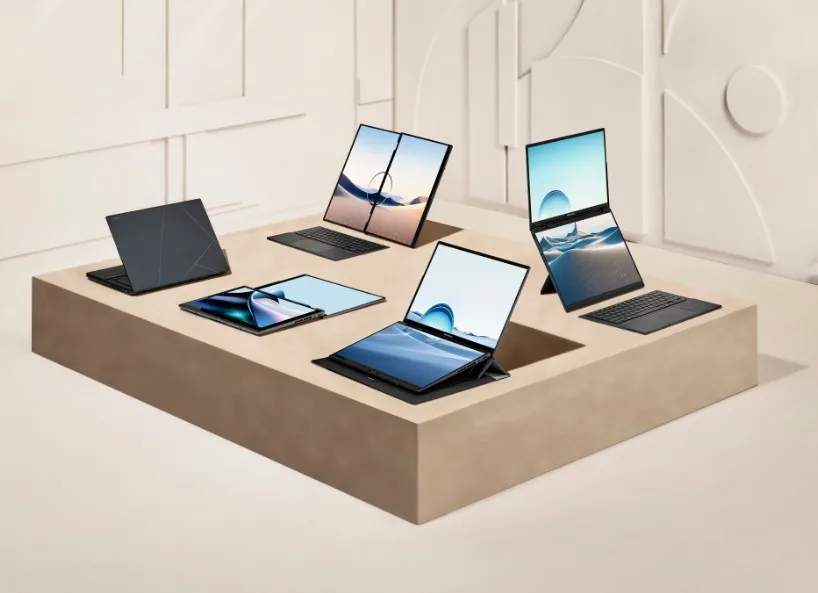
Two real 14-inch 3K OLED displays and a detachable Bluetooth keyboard, the dual-screen idea actually works on Linux as a plain extended desktop on a recent kernel, but at 1.65 kg with keyboard it is not a featherweight.
from € 1.899 $1,749 RRP
Check price on AmazonShown in EURUSD, switch with the currency toggle in the header. This is an indicative RRP, not a live price.
As an Amazon Associate (US, NL, DE, UK programs), qualifying purchases via these affiliate links may earn us a commission at no extra cost to you. Other markets not yet enrolled. How we make money. Verified 2026-05-20.
- Best for creative work programming office and web work
- Linux: minor fixes
Scorecard
Mean of six category scores, 0 to 10. Compiled from public sources. How we rate.
Strongest on display, with no category below average.
- Battery 6/10
- Display 9/10
- Build 7/10
- Keyboard 6/10
- Speed 7/10
- Value 5/10
Worth knowing
Stands out
- OLED display, deep contrast
- Bright 500-nit screen, readable in sunlight
- 120Hz screen, smoother motion
- Wide 100% P3 colour, creative-grade
Watch for
- RAM is soldered, no upgrade later
Linux
Works · Best on nixos. Confidence: high · How we score
Linux compatibility, per distro
- NixOS Minor setup
- Wi-Fi : needs tweak
- Bluetooth : works
- Fingerprint : unknown
- Webcam : works
- Audio : works
- Suspend : needs tweak
Both 14-inch OLED panels are detected as standard displays, so you can drive them with xrandr or KDE display settings. 11 or newer because of an MT7922 PCIe-link power state bug.
GitHub: zenbook-duo-2024-ux8406ma-linux →Show full report
.11 or newer because of an MT7922 PCIe-link power state bug. Community scripts handle keyboard-attach screen on/off and brightness sync.
- Ubuntu LTS Minor setup
- Wi-Fi : needs tweak
- Bluetooth : works
- Fingerprint : unknown
- Webcam : works
- Audio : works
- Suspend : needs tweak
Same MT7922-disconnect-on-keyboard-detach issue as NixOS, fixed by running a 6.11 or newer kernel from HWE or mainline. Second display works as a regular monitor, the stylus and touch work, but auto-rotation between dual-screen modes is manual.
Linux Mint Forums: Zenbook Duo keyboard detach Wi-Fi fix →
See the broader picture in the Linux compatibility hub, the full compatibility matrix, and the buying guides.
Specs
| CPU | Intel Core Ultra 9 185H |
|---|---|
| GPU | Intel Arc Graphics (integrated) |
| RAM | 32 GB (soldered, not upgradeable) |
| Storage | 1 TB |
| Screen | 14" 2880x1800 @ 120Hz, 500 nitsvery bright, easy in direct sun, smoother scrolling and motion |
| Weight | 1.65 kglight for daily carry |
| Battery | 75 Wh, around 8 h real-world |
Common questions
- Does the ASUS Zenbook Duo (UX8406MA, 2024) work with Linux?
- Mostly: it runs after one or two known fixes (checked on NixOS, Ubuntu LTS). Both 14-inch OLED panels are detected as standard displays, so you can drive them with xrandr or KDE display settings.
- What does the ASUS Zenbook Duo (UX8406MA, 2024) cost?
- RRP is about 1749 USD (1899 EUR in the EU); street price is often lower.
- How heavy is the ASUS Zenbook Duo (UX8406MA, 2024)?
- 1.65 kg (3.64 lb). That's light for daily carry.
- What's the battery life like?
- A 75 Wh pack, around 8 hours real-world mixed use. We score battery 6/10.
- Can I upgrade the RAM or storage?
- RAM is soldered, so the 32 GB it ships with is the RAM it dies with. Storage starts at 1 TB on this configuration.
- Which operating systems are supported?
- Ships with Windows. It also runs Linux; see the Linux block above for per-distro detail.
Ready to buy the ASUS Zenbook Duo (UX8406MA, 2024)?
Prices are indicative. How we make money.
from € 1.899 $1,749 RRP
Check price on AmazonShown in EURUSD, switch with the currency toggle in the header. This is an indicative RRP, not a live price.
As an Amazon Associate (US, NL, DE, UK programs), qualifying purchases via these affiliate links may earn us a commission at no extra cost to you. Other markets not yet enrolled. How we make money. Verified 2026-05-20.